
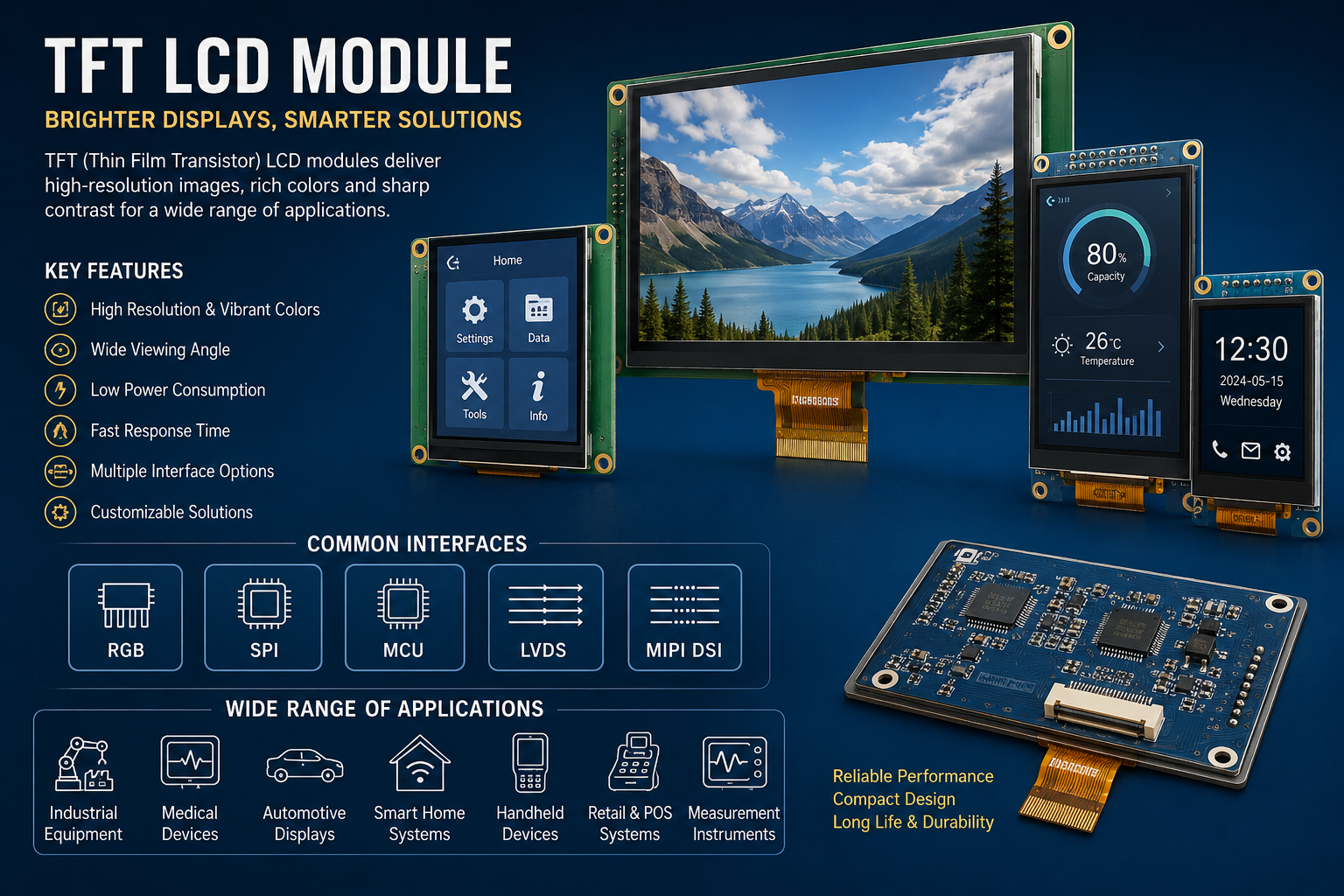
Choosing a display is no longer just about screen size. Product designers must balance readability, responsiveness, power consumption, durability, and development costs. Whether building an industrial controller or a portable medical instrument, selecting the right TFT LCD Module can influence how useful and reliable the finished product feels. This guide explains the technology, compares common configurations, and highlights the questions worth asking before procurement.
Understanding TFT Display Technology
TFT stands for thin-film transistor. In an active-matrix LCD, individual transistors control pixels, helping the panel deliver detailed images, consistent colors, and fast screen updates. Unlike self-emissive displays, an LCD needs a backlight to make its image visible.
A typical TFT LCD Module combines the display panel with a backlight, driver electronics, and a flexible connection or board. Some designs also incorporate a controller or touchscreen. Exactly what is included depends on the manufacturer’s specification.
How Active-Matrix Pixels Work
Each pixel uses controlled liquid crystals to regulate the light passing through color filters. The result is a full-color image suitable for menus, measurements, graphs, and visual alerts.
Why Integration Matters
When drivers and connectors are already matched to the panel, engineers can simplify assembly and reduce integration risk. However, module integration does not eliminate the need to verify firmware support, voltages, and mechanical fit.
TFT LCD Module vs. TFT Modules: Is There a Difference?
The terms often overlap. TFT Modules is a broad commercial description for TFT-based display assemblies, whereas TFT LCD Module explicitly identifies the liquid-crystal display technology. One is not automatically higher performing than the other.
Instead of relying on product labels, compare the complete datasheet. Two displays with the same diagonal measurement may have different resolutions, viewing angles, communication interfaces, and operating conditions.
| Selection point | Basic configuration | Enhanced configuration |
|---|---|---|
| Display type | Standard TFT LCD | Wide-viewing-angle TFT LCD |
| Touch input | No touchscreen | Capacitive or resistive touch |
| Connectivity | SPI or parallel MCU | RGB, LVDS, or MIPI DSI |
| Visibility | Indoor backlight | Higher-brightness option |
| Assembly | Separate cover lens | Bonded cover lens option |
These categories are illustrative, not fixed product tiers. Capabilities vary across suppliers.
Key Specifications Buyers Should Check
Before choosing TFT Modules, evaluate the complete application rather than focusing on resolution alone.
-
Screen size and resolution: Match available enclosure space with the smallest readable text and graphic details.
-
Brightness and contrast: Assess visibility under actual lighting, especially near windows or outdoors.
-
Viewing angle: Consider IPS-type panels when users approach the device from different directions.
-
Interface compatibility: Confirm that the processor supports the display’s signaling method and data bandwidth.
-
Power requirements: Review supply rails, backlight consumption, and battery-life implications.
-
Environmental tolerance: Check operating temperatures, vibration exposure, and protective construction.
-
Availability: Ask about production continuity, sample lead times, and replacement compatibility.
Interfaces and System Design
SPI interfaces can simplify wiring for modest graphics workloads, although update speed may be limited. Parallel RGB and MIPI DSI can support higher-throughput applications, provided the host processor is compatible. LVDS is also used in certain display assemblies. Always confirm timing requirements and pin assignments.
Where TFT Modules Add Value
Modern TFT Modules appear in factory equipment, smart appliances, payment terminals, vehicle dashboards, laboratory tools, and connected home devices. Their value comes from presenting complex information clearly within a compact space.
In industrial automation, color-coded alarms and live process data help operators recognize conditions quickly. Healthcare equipment may use readable measurements and intuitive navigation, while consumer products benefit from polished graphics and multilingual menus.
The ideal design depends on context. A battery-powered sensor might prioritize low backlight power, while a machine-mounted interface may demand stronger visibility and longer component availability.
Common Selection Mistakes
The most expensive display is not necessarily the best choice. Teams frequently underestimate software integration, connector placement, touch responsiveness, and mechanical tolerances. A prototype that looks excellent on a desk may become difficult to read after installation.
Ask suppliers for electrical drawings, interface documentation, optical specifications, and sample units. Test the TFT LCD Module with real application graphics under expected lighting and temperature conditions. Check whether the touchscreen remains usable with gloves, moisture, or protective covers when those factors matter.
For high-volume projects, confirm incoming inspection criteria, acceptable pixel defects, and documented change-notification procedures before signing purchase agreements.
Frequently Asked Questions
1. What does TFT mean?
TFT means thin-film transistor, a technology used to control pixels in active-matrix LCD panels.
2. Are TFT displays always touch-enabled?
No. Touch input is an optional feature and may require a separate controller.
3. Does a TFT screen require a backlight?
Yes. Conventional TFT LCDs use a backlight because the liquid crystals do not emit light.
4. What is the benefit of IPS?
IPS-type LCD technology generally improves viewing angles and color consistency compared with many basic TN implementations.
5. Is SPI suitable for every display?
No. It suits many compact interfaces but can constrain high-resolution, high-frame-rate updates.
6. Can TFT Modules work outdoors?
Yes, with suitable brightness, optical treatment, environmental protection, and application-specific validation.
7. Which touchscreen is better?
Capacitive touch supports familiar gestures; resistive touch can be useful for certain glove-operated systems.
8. How should resolution be selected?
Choose it according to viewing distance, interface complexity, processor capability, and cost.
9. Why does operating temperature matter?
Temperature affects liquid-crystal performance and can influence readability and response time.
10. What should buyers request from suppliers?
Request datasheets, samples, lifecycle information, interface details, and quality documentation.





Leave a Reply