
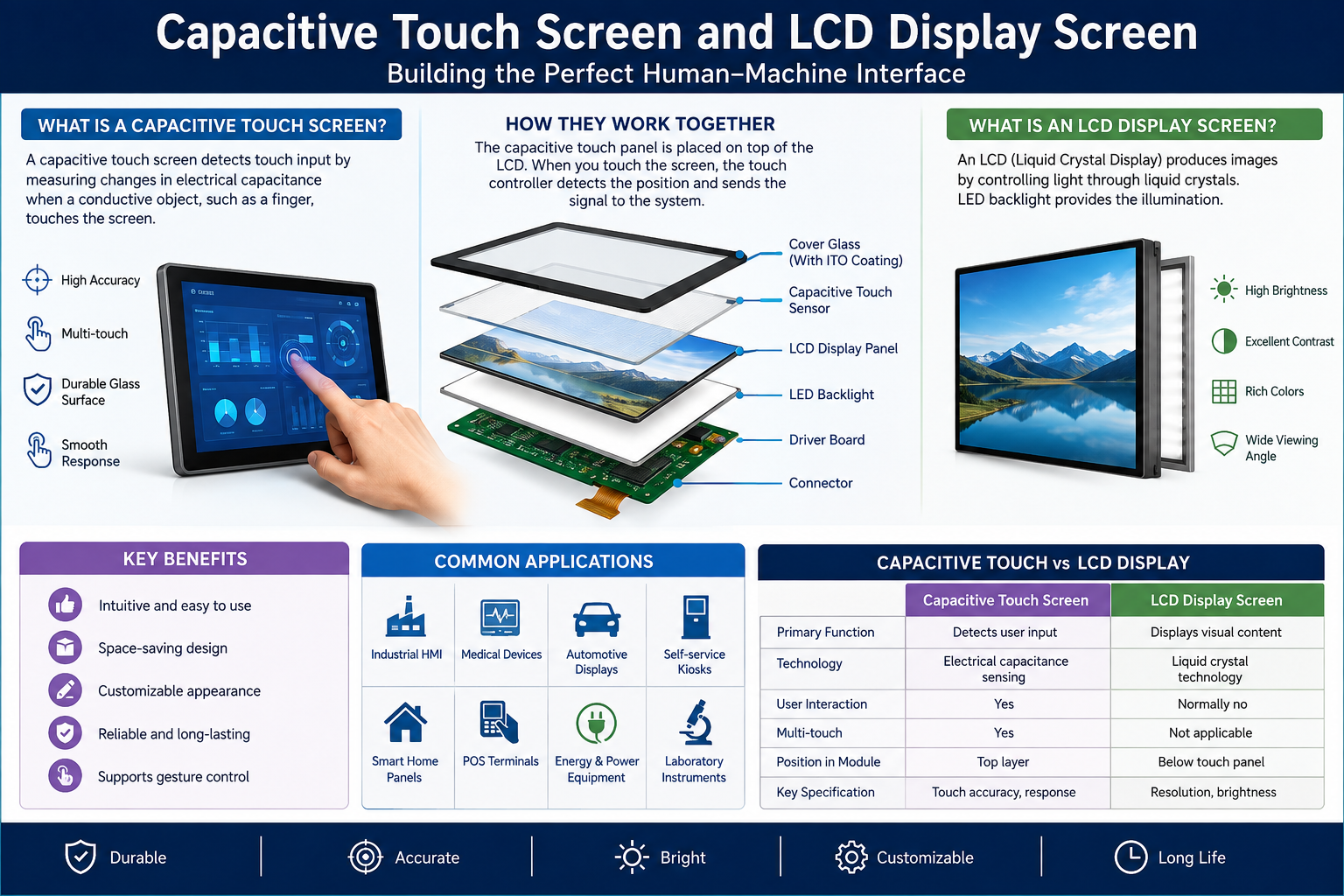
Modern electronic devices rely on display technology to deliver clear visuals, smooth interactions, and convenient operation. From smartphones and tablets to industrial control panels and commercial equipment, display screens have become an essential part of everyday technology. Two important components behind these experiences are the Capacitive Touch Screen and LCD Display Screen.
Although these technologies often work together, they perform different functions. A capacitive touch screen detects finger movements and touch commands, while an LCD display screen produces the images, text, and graphics users see. Understanding their features, differences, and applications can help businesses and consumers choose the right display solution.
What Is a Capacitive Touch Screen?
A Capacitive Touch Screen is an advanced touch-sensitive technology that detects input through changes in electrical capacitance. Unlike traditional resistive touch panels, which respond to physical pressure, capacitive technology generally detects the electrical properties of a finger or a compatible stylus.
This technology is widely used because it provides responsive operation, accurate touch recognition, and a smooth user experience.
How Does Capacitive Touch Technology Work?
A capacitive touch panel contains a conductive layer that maintains an electrical field across its surface. When a finger approaches or touches the screen, it changes the electrical capacitance at that particular location.
The controller detects this change and translates it into a command.
Its main operating features include:
-
Touch sensitivity: Responds to light finger contact.
-
Multi-touch support: Recognises multiple touch points simultaneously.
-
Fast response: Provides smooth navigation and interaction.
-
High accuracy: Supports precise selections and gestures.
-
Durable surface: Typically uses protective glass for everyday operation.
What Is an LCD Display Screen?
An LCD Display Screen, also known as a Liquid Crystal Display, is a visual display technology used to present images, information, videos, and text.
LCD technology uses liquid crystals to control how light passes through the display. Unlike self-emissive display technologies, conventional LCD panels require a backlight to produce visible images.
LCD displays are popular because they offer practical performance, energy efficiency, and flexible screen sizes.
Key Features of LCD Display Technology
An LCD display screen offers several advantages for different electronic applications:
-
Clear image quality: Displays sharp text and detailed visuals.
-
Low power consumption: Generally consumes less energy than older display technologies.
-
Slim construction: Suitable for compact electronic equipment.
-
Consistent brightness: Provides suitable visibility for many indoor environments.
-
Wide applications: Available in numerous sizes and resolutions.
Capacitive Touch Screen vs LCD Display Screen
Although both technologies are commonly integrated into modern devices, they serve different purposes.
|
Feature |
Capacitive Touch Screen |
LCD Display Screen |
|---|---|---|
|
Main function |
Detects touch input |
Displays visual information |
|
Technology |
Electrical capacitance |
Liquid crystal technology |
|
User interaction |
Touch-based |
Visual output |
|
Multi-touch |
Usually supported |
Not inherently supported |
|
Main advantage |
Responsive interaction |
Clear image presentation |
|
Common applications |
Smartphones and kiosks |
Monitors and televisions |
In many modern products, these technologies work together. The LCD panel displays content, while the capacitive touch layer allows users to interact directly with it.
Benefits of Combining Capacitive Touch and LCD Technology
Combining a capacitive touch screen with an LCD display screen creates a convenient and efficient interface for modern electronic products.
Some important benefits include:
1. Smooth User Experience
Users can navigate menus, select options, zoom images, and control applications using simple finger movements.
2. Clear Visual Performance
LCD technology provides readable text, colourful graphics, and detailed images, making information easier to understand.
3. Modern and Compact Design
Integrated display solutions reduce the need for separate input devices such as keyboards and physical control buttons.
4. Better Operational Efficiency
Businesses can use touch-enabled displays to simplify workflows, improve accessibility, and make equipment easier to operate.
5. Flexible Applications
These display combinations are suitable for consumer electronics, commercial equipment, healthcare devices, and industrial systems.
Common Applications of Touch and LCD Display Technology
The combination of touch functionality and visual display technology supports many industries.
Popular applications include:
-
Smartphones and tablets: For browsing, communication, and entertainment.
-
Industrial control panels: For monitoring machinery and controlling production processes.
-
Medical equipment: For accessing patient information and operating diagnostic devices.
-
Retail kiosks: For product searches, digital payments, and customer assistance.
-
Automotive displays: For navigation, entertainment, and vehicle information.
-
Educational devices: For interactive lessons and digital learning.
-
Self-service terminals: For ticket booking, registration, and information access.
How to Choose the Right Display Solution
Selecting the right display requires understanding your application, operating environment, and technical requirements.
Consider these important factors:
-
Screen size: Choose dimensions that provide comfortable viewing and interaction.
-
Resolution: Higher resolution can deliver sharper images and clearer text.
-
Touch sensitivity: Ensure the panel responds accurately to user input.
-
Brightness: Select suitable brightness levels for indoor or outdoor environments.
-
Durability: Consider protective glass and resistance to scratches.
-
Connectivity: Check compatibility with your existing electronic equipment.
-
Operating conditions: Evaluate temperature, humidity, and expected usage.
Frequently Asked Questions
1. What is a capacitive touch screen?
It is a touch-sensitive panel that detects changes in electrical capacitance when a finger or compatible stylus approaches its surface.
2. What is an LCD display screen used for?
An LCD display screen presents visual information, including images, videos, graphics, and text.
3. Are capacitive touch screens better than resistive screens?
Capacitive screens generally offer better touch sensitivity, smoother operation, and multi-touch functionality. Resistive screens can be useful in applications requiring pressure-based input.
4. Can a capacitive touch screen work with an LCD?
Yes. Capacitive touch panels are commonly integrated with LCD panels to create interactive displays.
5. Does every LCD display support touch?
No. A standard LCD displays visual content but requires an additional touch-sensitive layer or integrated touch technology for touch operation.
6. What are the advantages of an LCD display screen?
Its advantages include clear visuals, relatively low power consumption, slim construction, and availability in different sizes and resolutions.
7. Do capacitive touch screens support multiple fingers?
Yes. Most modern capacitive touch screens support multi-touch gestures, depending on their design and controller.
8. Where are capacitive touch screens commonly used?
They are widely used in smartphones, tablets, industrial equipment, kiosks, automotive systems, and interactive displays.
9. How long does an LCD display screen last?
Its lifespan depends on display quality, backlight technology, operating temperature, usage patterns, and maintenance.
10. How can I choose a suitable touch display?
Consider screen dimensions, resolution, brightness, touch performance, durability, compatibility, and environmental conditions before making a decision.










Leave a Reply